Your Ad Here

.

10 Free Blogger Template: Ishthyle - Style Redefined

This is another 2-column template with some great pre-added features and working fine with all latest versions of major browsers.
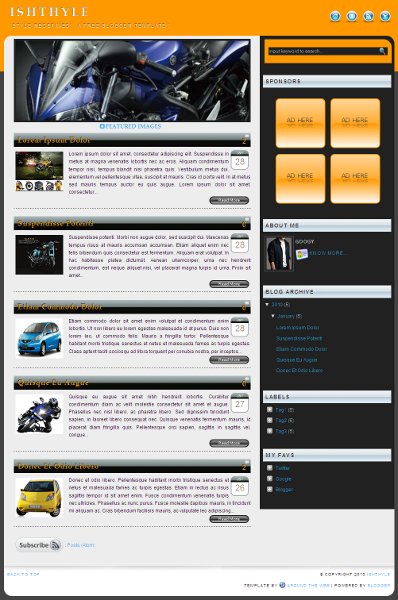
Ishthyle-Template
Screen-shot:Ishthyle-Template
Features:

Credits:
For Social Media Bookmarking Icons: Evohosting


--------------------------------------
Update On 14 March,2010:

If you are experiencing any glitches with "Javascript" files on this template then either download the updated template file from the link above or find following codes;
Code:
<script src='http://www.yourjavascript.com/189322401250/jquery.corner.js' type='text/javascript'/>
<script src='http://www.yourjavascript.com/25949711022/jquery.cycle.js' type='text/javascript'/>
<script src='http://www.yourjavascript.com/8314201106/readmore.js' type='text/javascript'/>


and replace with following codes respectively within the template;
Code:
<script src='http://www.weebly.com/uploads/3/9/3/0/3930875/jquery.corner.js' type='text/javascript'></script>
<script src='http://www.weebly.com/uploads/3/9/3/0/3930875/jquery.cycle.js' type='text/javascript'></script>
<script src='http://www.weebly.com/uploads/3/9/3/0/3930875/readmore-ishthyle.js' type='text/javascript'></script>

Read More...

6 Blogger | 15 Awesome Calendar Icons For Post Date Header

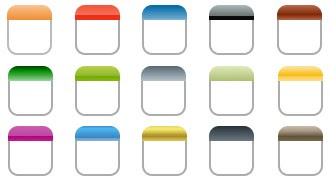
A calendar icon adds little beauty to a blog when used as post date header. You can see one here on this blog or might have seen on several other blogs around the web. And if you don't have it and wish to have a good looking one on your blog then grab it here for today I'm sharing fifteen (15) awesome calendar icons with you all to choose the best that suits your blog.

Calender Icons

DOWNLOAD (cal_icons.zip)

Now, most of you must be wondering what to do with the icon only, so here goes the installation steps and codes to see this in action on your blog;

  • Step 01:
Go to Blogger > Layout > Edit HTML > (click on) Download Full Template and save a backup of your template.
  • Step 02:
(Check) Expand Widget Templates, find ]]></b:skin> and now paste the following CSS codes just above it;

Code:
* Post Date Header Calendar Icon
-----------------------------------------------
*/
.calendar {
height: 50px;
width: 45px;
background: url(Calendar Icon Image Url Here) no-repeat;
font: normal 22px Arial;
color: #9C9284;
text-align: center;
margin: 0 4px 4px 0;
padding: 0 2px 0 0;
line-height: 100%;
float: left;
}
.calendar span {
height: 18px;
display: block;
font: normal 11px Arial;
color: #ffffff;
text-align: center;
padding-top: 0;
}

and replace the texts in RED with the Url of Calendar Icon that you have chosen as per your blog's look and uploaded (to the image hosting site you use), and you can also play with the texts in Blue in the above code to change the colour of the texts that will appear with in the calendar icon.
  • Step 03:
Now find <h3 class='post-title entry-title'> and paste following codes just before it;

Code:
<div class='calendar'>
<script type='text/javascript'>
var timestamp = &quot;<data:post.timestamp/>&quot;;
if (timestamp != &#39;&#39;) {
var timesplit = timestamp.split(&quot;,&quot;);
var date_yyyy = timesplit[2];
var timesplit = timesplit[1].split(&quot; &quot;);
var date_dd = timesplit[2];
var date_mmm = timesplit[1].substring(0, 3);
}
</script>
<span><script type='text/javascript'>document.write(date_mmm);</script></span>
<script type='text/javascript'>document.write(date_dd);</script>
</div>

and save the template.
  • Step 04:
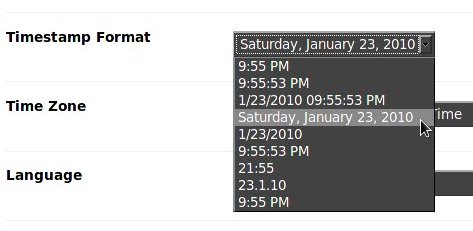
This is the most important step, move to (Blogger) > Settings > Formatting and scroll down to the Timestamp Format options and choose the format just as shown in the image below;

Timestamp Format
Screen-shot: Timestamp Format

Now, save your settings, check preview of your blog and enjoy a new look of your blog with a sweet smile on your face.

For any further help do leave a comment !

Read More...

0 Free Blogger Template: Veer - The Warrior

Nothing official about it, just consider it as an unofficial act of mine promoting my favourite bollywood superstar Salmaan Khan's most awaited mega movie "Veer - An Epic Love Story Of A Warrior" that is to be released today itself, and here I wanted to release my part of it just for fun, so here it is another free blogger template: "Veer - The Warrior"!


Veer-The Warrior

Screen-shot:Veer-The Warrior Blogger Template


To know all about the movie visit: Veer

Template installation instruction is included with "Download Pack", for any further help leave a comment!

Read More...

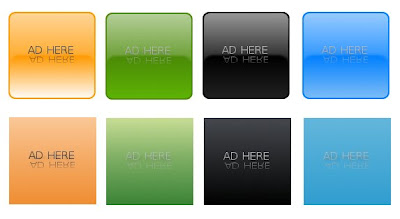
0 Blogger | Free 125x125 AD Banners

Today I'm going to share eight different 125x125 ad banners in four different colors and with two different styles. Confused?? Ok, it's a simple calculation, the quantity is eight, i.e.;
  1. Glossy Orange
  2. Glossy Green
  3. Glossy Black
  4. Glossy Blue
  5. 3D Orange
  6. 3D Green
  7. 3D Black
  8. 3D Blue
Now, the four different colors are;
  1. Orange
  2. Green
  3. Black
  4. Blue
And, the 2 styles are;
  1. Glossy with rounded corners.
  2. 3D (I used the 3D gradients)
125x125ADS
Screen-shot

DOWNLOAD (in zip format)

If you don't have 125x125 AD panel on your blogger blog and want to add then go to Blogger > Layout > Add a gadget (at sidebar & width of sidebar should be more than 250px) > HTML/Javascript and paste the following code in the content area;

Code:
<!-- 125x125 Banner AD Panel Starts-->
<center><a href='125x125 AD LINK URL'><img src='125x125 Banner Image URL'/></a> <a href='125x125 AD LINK URL'><img src='125x125 Banner Image URL'/></a></center>
<!-- 125x125 Banner AD Panel Ends-->

and replace the RED texts with the 125x125 banner image Url(s) & BLUE texts with link Url(s).
Now, save the widget and check preview.
Read More...

0 Free Blogger Template: Carbonika

This is another 2 column template and a dark one with left sidebar and main wrapper at the right side. Here in this template I have given sliding RSS & Twitter buttons at the top right corner, hope you all would like that. 125x125 ad box at the sidebar, default avatar image, admin's comment with different backgroud are some common though great features included in this template. The rounded corner effect is working well with Firefox & Safari but there are some glitches with Opera & IE. All rest fine and tested on Firefox 3.5, IE8, Opera 10.10 & Safari 4.


Sreenshot-Carbonika
Screenshot- Carbonika Template


Installation instructions is included with download pack. For any further help come through the comments section.
Read More...

0 Free Blogger Template: Bombastic Blue

This is a three (03) column blogger template with left and right sidebars and pre-added features like "Follow Me" button with "Followers Counter", "Email Subscription Form Widget" for feeds and "Related Posts Widget" at post footer. There is also a cute "Calendar Image" before the post content showing date of the post.

Screenshot-BB
Screen-shot: Bombastic Blue Template.


Installation Steps:

Backup you existing template:
  • Go to Layout > Edit HTML, and then click Download Full Template and save it.
Install "Bombastic Blue" Template:
  • Go to Layout > Edit HTML
  • Click on the Browse Button and upload the bombasticblue-template.xml file.
  • Click on the Save button.
To edit "Navigation Menu-bar" find the following codes;
Code:
<ul>
<li><a expr:href='data:blog.homepageUrl'>HOME</a></li>
<li><a href='LINK URL'>LINK 1</a></li>
<li><a href='LINK URL'>LINK 2</a></li>
<li><a href='LINK URL'>LINK 3</a></li>
<li><a href='LINK URL'>LINK 4</a></li>

and replace RED texts with link Url(s) and link titles respectively as per your requirement.

To learn how to edit "Twitter Follow Me & Followers Counter Widget" click here.

To learn how to edit "Email Subscription Form Widget" for feeds click here.


Credits:
For Social Media Icons at sidebar: Bruno Maia, IconTexto - http://www.icontexto.com
Read More...

0 Six (06) Free Read More Buttons

"Read More" is a pretty blogger feature which allows visitors to have a look of a portion of text and image from the beginning of each post as summary instead of entire post. If a visitor wants to read the full post, simply clicks on "read more" link and gets redirected to the full post. Some bloggers use text link and some a image as "read more" link. So, if you are using image link and want to replace with some other image or if you are using text link and planning to replace with an image link here are six (06) simple though gorgeous "Read More" images for you all to use freely.


Download complete set in .zip format from here. Hope you will like them all.

Read More...